
Every network and CCTV quotation asks the same question sooner or later: which cable category do we specify? Pick too low and you cap the system for the next fifteen years. Pick too high and you pay for copper, labour and tray space you never use. This guide compares Cat5e, Cat6, Cat6A and Cat7 in plain field terms, with a short look at Cat8, so you can choose the right cable for CCTV, offices and data centres.
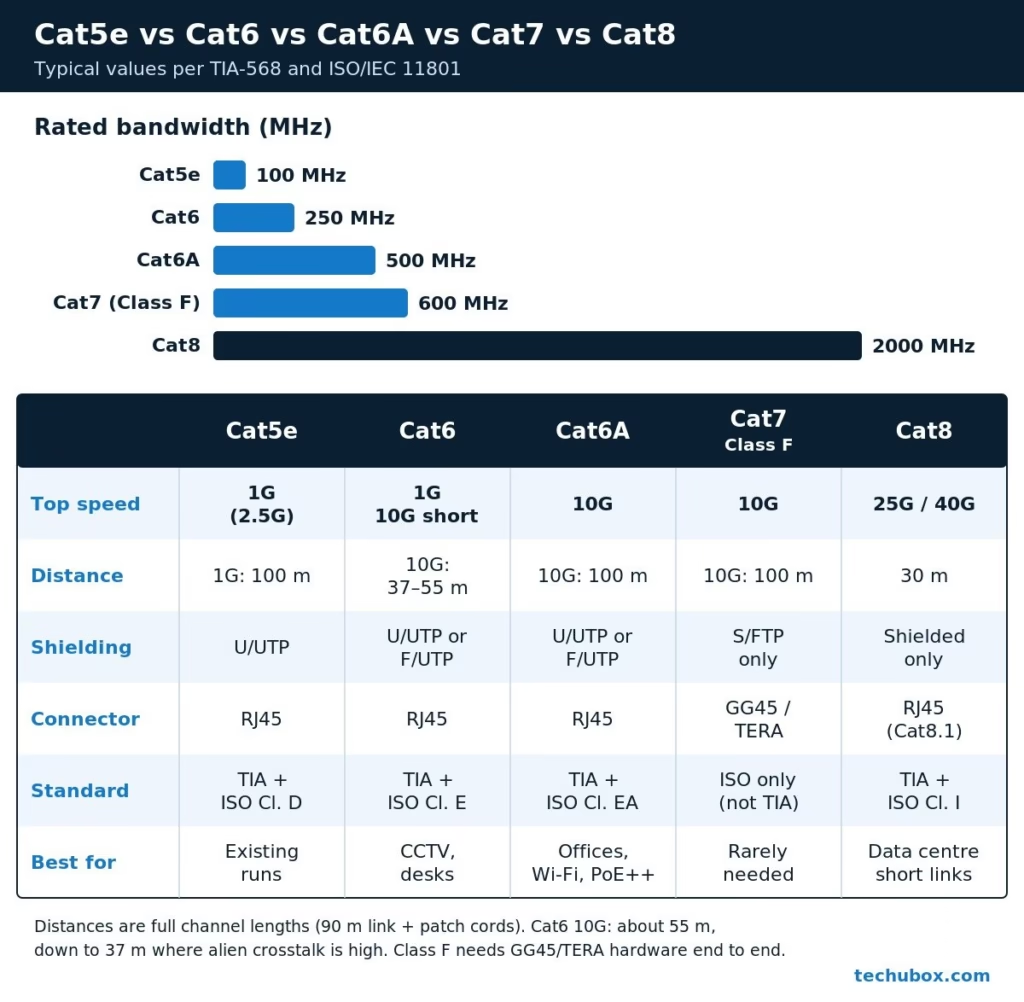
Quick answer: Cat5e (100 MHz) and Cat6 (250 MHz) both carry 1 Gbps over a full 100 m channel. Cat6 can also run 10 Gbps, but only to about 37 to 55 m. Cat6A (500 MHz) is the only common RJ45 category that carries 10 Gbps over the full 100 m, which makes it the safe choice for new offices, Wi-Fi and high-power PoE. Cat7 (600 MHz) is an ISO/IEC Class F cable, not a TIA category, and officially needs GG45 or TERA connectors. For most projects it adds nothing over Cat6A. Cat8 is for short data centre links only.
Category vs Class: Two Standards, One Cable
Two bodies write the rules for structured copper cabling. In North America (and in many Middle East and African specifications) you will see the TIA-568 categories. Internationally, ISO/IEC 11801 uses classes. They mostly line up:
| TIA category | ISO/IEC class (channel) | Rated bandwidth |
|---|---|---|
| Cat5e | Class D | 100 MHz |
| Cat6 | Class E | 250 MHz |
| Cat6A | Class EA | 500 MHz |
| No TIA equivalent (“Cat7”) | Class F | 600 MHz |
| No TIA equivalent (“Cat7A”) | Class FA | 1,000 MHz |
| Cat8 | Class I / Class II | 2,000 MHz |
Bandwidth in MHz is not the same as speed in Gbps. It is the frequency range over which the cable is tested and guaranteed. Higher frequency headroom lets equipment push more data through with acceptable noise and crosstalk.
Speed and Distance: What Each Cable Really Does
All distances below are channel lengths: up to 90 m of fixed cable (the permanent link) plus patch cords at both ends, 100 m in total.
| Cable | Bandwidth | 1 Gbps | 10 Gbps | Typical shielding | Connector |
|---|---|---|---|---|---|
| Cat5e | 100 MHz | 100 m | Not supported | U/UTP | RJ45 |
| Cat6 | 250 MHz | 100 m | About 37 to 55 m | U/UTP or F/UTP | RJ45 |
| Cat6A | 500 MHz | 100 m | 100 m | U/UTP or F/UTP | RJ45 |
| Cat7 (Class F) | 600 MHz | 100 m | 100 m | S/FTP only | GG45 or TERA |
| Cat8 | 2,000 MHz | 30 m channel | 30 m (also 25G/40G) | Shielded only | RJ45 (Cat8.1) |
Why Cat6 10G is “37 to 55 m”
At 10 Gbps the limiting factor is alien crosstalk: noise coupled from neighbouring cables in the same bundle. The switch can cancel crosstalk inside its own cable, but not noise coming from other cables. Cat6 has no alien crosstalk limit in its specification, so its 10G reach depends on the installation. TIA TSB-155 says 10GBASE-T should work up to 37 m on Cat6 and between 37 and 55 m depending on the crosstalk environment. Tight bundles in an office ceiling sit at the short end.
Cat6A was created to fix exactly this. Larger spacing, a thicker jacket or a shield controls alien crosstalk, so 10 Gbps is supported to the full 100 m.
Pro tip: For 2.5 and 5 Gbps (common on modern Wi-Fi access points), IEEE 802.3bz targets 2.5 Gbps over Cat5e and 5 Gbps over Cat6 at 100 m. Results still depend on the installed cable quality, so test before you promise multi-gig on an old Cat5e run.
Shielding Types: UTP, F/UTP and S/FTP
ISO/IEC 11801 names cables as overall screen / pair screen + TP. U means unshielded, F means foil, S means braid. The three you will meet most often:
- U/UTP (UTP): no foil or braid. Lightest, cheapest and easiest to terminate. Relies on pair twist for noise rejection. Ideal for most offices and CCTV.
- F/UTP (FTP): one overall foil around all four pairs. Better protection against outside noise and alien crosstalk. Common for Cat6A in industrial areas.
- S/FTP: each pair in its own foil, plus an overall braid. Best noise immunity. Mandatory for Cat7 Class F and used for Cat8.
A shield only works if it is continuous and bonded to earth. That means shielded jacks, shielded patch panels, shielded patch cords and a properly earthed rack. A shielded cable terminated on unshielded jacks gives you the cost of shielding without the benefit.

When to choose shielded: next to heavy machinery, VFDs, generators, lift motor rooms, radio transmitters or long parallel runs beside power cables. In a normal office, a well-installed U/UTP system is simpler and performs well.
Cat7: Why It Is Not What the Box Says
Cat7 is the most misunderstood cable on the market.
- It is not a TIA category. TIA went from Cat6A straight to Cat8. “Category 7” is only defined by ISO/IEC 11801 as Class F (600 MHz), with Class FA (Cat7A) at 1,000 MHz.
- It officially uses GG45 or TERA connectors, not RJ45. A Class F channel needs connectors rated for 600 MHz. The RJ45 interface is not specified for that, so a Cat7 cable with RJ45 plugs cannot be certified as a Class F channel.
- It is S/FTP only. Thick, stiff and slower to terminate.
Most “Cat7” patch cords sold online come with RJ45 plugs. Plug them into RJ45 equipment and the channel performs, at best, like the RJ45 hardware allows, which is the Cat6A range. You pay more for no extra speed, because the switches and cameras on the market use RJ45 ports and 10GBASE-T is already fully supported on Cat6A.
My field advice: unless a consultant’s specification calls for a complete Class F system with matching GG45 or TERA hardware, specify Cat6A instead.
Cat8 in Brief
Cat8 (TIA-568) is rated to 2,000 MHz and supports 25GBASE-T and 40GBASE-T, but only over a 30 m, two-connector channel. It is designed for switch-to-server links inside data centre rows. It is always shielded and uses an RJ45-style connector (Cat8.1 / Class I). It is not for horizontal cabling to desks or cameras, and in practice many data centres use fibre or direct-attach cables for these short links anyway.
PoE Heat and Cable Bundles
PoE sends DC current down the pairs, and current makes heat. With IEEE 802.3bt (PoE++), a switch port can supply up to 90 W. One cable warms only slightly, but in a large, tight bundle the cables in the middle cannot shed heat. Higher temperature raises insertion loss, which reduces the usable length and can age the jacket.
- Thicker conductors run cooler. Cat6A is usually 23 AWG and often handles PoE heat better than thinner Cat5e.
- Keep bundles modest. Avoid huge round bundles. Spread cables in wide, flat layers on ladder tray or use several smaller bundles.
- Avoid hot spaces. Roof voids and outdoor trays in Gulf summers already run hot before PoE adds its share.
- Follow the guidance. TIA TSB-184-A and ISO/IEC TS 29125 give bundle size and temperature guidance for remote powering. Check your cable manufacturer’s PoE datasheet too.
Pro tip: For PTZ cameras with heaters, high-power access points or LED lighting on PoE++, specify Cat6A even if the data rate is only 1 Gbps. You are buying it for the copper, not the bandwidth.
Warning: CCA vs Pure Copper
Copper-clad aluminium (CCA) cable has an aluminium core with a thin copper coating. It looks the same on the reel and is cheaper, which is exactly the problem.
- It is not compliant with TIA-568 or ISO/IEC 11801, which call for solid copper conductors.
- Higher resistance means more voltage drop and heat on PoE. Cameras reboot at night when IR switches on.
- Aluminium is brittle. Conductors crack at punch-downs and bends, and oxidise at the contact.
- It fails certification tests and can void manufacturer warranties.
Check before you buy: scrape a conductor end (CCA shows silver under the copper), weigh the box (CCA is noticeably lighter), and ask the supplier for the datasheet and third-party verification. Specify “solid bare copper” in every BOQ.
LSZH Jackets
LSZH (Low Smoke Zero Halogen) jackets give off little smoke and no halogen acid gases when they burn. In an enclosed building, that protects people escaping and protects equipment from corrosive fumes. LSZH is commonly required on projects in Saudi Arabia, the Gulf and Europe, especially in hospitals, airports, tunnels, malls and high-rise buildings. Relevant tests include IEC 60332 (flame spread), IEC 61034 (smoke density) and IEC 60754 (halogen acid gas).
Note that LSZH is not automatically the same as a North American plenum (CMP) or riser (CMR) rating. Always follow the project specification and local fire code. For outdoor and direct-burial runs, use a UV-resistant, water-blocked outdoor jacket instead, and change to an LSZH cable where it enters the building if the specification requires it.
Which Cable to Use: CCTV, Offices and Data Centres

| Application | Recommended | Why |
|---|---|---|
| IP CCTV cameras (fixed) | Cat6 U/UTP | Cameras need 1 Gbps at most, often under 20 Mbps. Cat6 gives 100 m with good PoE margin. |
| PTZ, heaters, PoE++ | Cat6A | Thicker conductors, better heat handling in bundles |
| Existing small systems | Cat5e (keep) | Fine for 1 Gbps cameras if it tests clean |
| Office desks | Cat6 minimum, Cat6A preferred | Cat6A future-proofs for 10G over the building’s life |
| Wi-Fi access points | Cat6A | Multi-gig uplinks and higher PoE classes |
| Data centre, server to switch | Cat6A for 10G; Cat8 for 25G/40G under 30 m | Fibre or DAC for anything faster or longer |
| Over 90 m or between buildings | Fibre | Copper stops at 100 m; fibre also isolates lightning surges |
For CCTV, the camera is rarely the bottleneck; the cable length and the PoE budget are. Read the CCTV installation and wiring guide for termination and PoE budget examples, and plan switch locations with the Network & CCTV Designer. Once the cabling is in, separate camera traffic with a VLAN for CCTV. For the basics of each cable type, see our network cables guide.
Troubleshooting Cable-Related Problems
| Symptom | Likely cause | Fix |
|---|---|---|
| Link negotiates at 100 Mbps instead of 1 Gbps | One pair open or mis-terminated | Test all four pairs, re-terminate (T568B both ends) |
| 10G link drops or falls back to 1G on Cat6 | Run too long, alien crosstalk | Keep under 37 to 55 m, unbundle, or re-cable with Cat6A |
| Camera reboots at night | CCA cable or long run, voltage drop with IR on | Replace with solid copper, check PoE budget |
| Noise or errors near machinery | EMI on U/UTP | Re-route, cross power at 90 degrees, use F/UTP with proper earthing |
| Shielded link fails test | Broken shield continuity, unshielded jacks | Use shielded components end to end, bond rack to earth |
More camera faults are covered in the CCTV troubleshooting guide.
Frequently Asked Questions
Is Cat6 enough for IP CCTV cameras?
Yes, for almost all fixed cameras. A camera stream is typically a few Mbps, and Cat6 carries 1 Gbps plus PoE over a 100 m channel. Choose Cat6A for high-power PTZ cameras or very large bundles.
Can Cat6 run 10 Gbps?
Yes, but only on short runs: up to about 37 m in crowded bundles and up to about 55 m in good conditions, per TIA TSB-155. For 10 Gbps over 100 m, use Cat6A.
Is Cat7 better than Cat6A?
On paper Class F has more bandwidth, but it is not a TIA category and officially needs GG45 or TERA connectors. With normal RJ45 equipment it gives no practical gain over Cat6A, so Cat6A is the better buy for most projects.
Do I need shielded cable?
Only in high-noise areas such as plant rooms, near VFDs or radio transmitters, or where the specification calls for it. Shielding must be continuous and earthed end to end to work.
What is the maximum length for Cat5e, Cat6 and Cat6A?
100 m per channel for all three, made up of 90 m fixed cable plus patch cords. I design to about 90 m total to leave margin.
Is CCA cable acceptable for short runs?
No. CCA is not standards-compliant, runs hotter on PoE and cracks at terminations. Always specify solid bare copper, even on short runs.