
Introduction
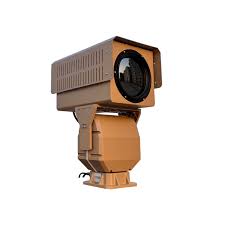
Thermal cameras do not require a light source to capture images & excellent for providing enhanced coverage in diverse environments, such as harsh conditions or extreme darkness. thermal cameras have long-range detection and temperature measurement capabilities, allowing them to be used in conjunction with CCTV cameras to achieve all-weather monitoring and surveillance. An infrared camera or thermal imaging camera, is a type of camera that captures images using the heat emitted by objects rather than visible light. It detects the infrared radiation emitted from objects and converts it into an image that can be seen by humans.
Thermal cameras are widely used in applications:
used in applications where traditional cameras are not effective, such as in low light or total darkness, in smoke or fog, or in situations where there may be obstacles blocking the camera’s view. They are commonly used in a variety of industries, including security and surveillance, firefighting, industrial inspection, and medical imaging.
-
Industrial facilities, gas pumps
-
Forest early fire prevention
-
Over-heating detection
-
Gas detection
-
perimeter protection
-
Government & Defense
Industrial facilities, gas pumps:
Optical gas imaging (OGI) camera visualizes hazardous areas for gas leaks. Continuous monitoring, you can catch dangerous, costly hydrocarbon or volatile organic compound leaks methane, hydrocarbons, and VOC emissions from oil and gas production, and transportation and take immediate action.

Thermal camera with different models has the capability to detect hazardous gas, flame & industrial inspection such as:
-
Hydrocarbon.
-
Co2.
-
Methane.
-
Refrigerant gases.
-
Furnaces, heaters, and boilers.
-
Commercial & Residential Building Inspection.
-
Machine Area Scan Cameras
Early fire prevention
-
Infrared (thermal) Camera systems are not fire detection, Based on temperature measurement, the camera can detect a potential fire hazard, such as sudden temperature rise or abnormal temperature exceeding a programmed threshold By giving early warning signals, it can help prevent the occurrence of fire and allow timely response before a fire spreads.

-
A lit cigarette is too small for CCTV cameras and Fire Alarm systems. But a thermal camera can detect it and send a signal to the control room.
-
Mechanical equipment conveyor, bearing, motor, drive, and pump are prone to damage due to overheating.
How to Choose the Right Thermal Camera for a Site
A thermal camera is only useful if it is matched to the job. First write down what you need to see (people, vehicles, hot equipment), how far away it is, and what should happen on detection. The answers decide the resolution, lens and camera type.
1. Security camera or temperature-measuring camera?
Thermal cameras for ELV projects usually fall into two groups:
- Thermal imaging (security) cameras show heat contrast so you can detect a person or vehicle in darkness, light fog or smoke. They are used for perimeter protection and long-range detection.
- Radiometric (temperature-measuring) cameras assign a temperature value to each pixel. They are used for overheating detection on electrical panels, conveyors, motors and storage areas, with alarms set on temperature thresholds.
2. Sensor resolution and lens
Thermal sensors have far fewer pixels than visible cameras. Common resolutions are 160 x 120, 256 x 192, 384 x 288 and 640 x 512. A higher resolution or a longer focal length lens puts more pixels on the target, which increases range but narrows the field of view. A wide lens covers more area but sees less far.
3. Sensitivity (NETD)
NETD (noise equivalent temperature difference) shows the smallest temperature difference the sensor can resolve. A lower number is better. Values below 50 mK are typical for security-grade cameras; lower values give a cleaner image in low-contrast conditions such as rain, fog, or hot afternoons when the background is close to body temperature.
Worked Example: Estimating Detection Range
A common way to estimate range is the Johnson criteria, which gives the number of pixels needed across a target. Typical values are about 1.5 pixels for detection (something is there), about 6 pixels for recognition (it is a person, not an animal) and about 12 pixels for identification of the target class. A person is usually modelled with a critical dimension of about 0.75 m.
Take a camera with a 12 µm pixel pitch and a 25 mm lens:
- Angle covered by one pixel (IFOV) = pixel pitch / focal length = 0.012 mm / 25 mm = 0.00048 rad (0.48 mrad).
- Size of one pixel at distance D = D x 0.00048.
- Range = target size / (pixels needed x IFOV).
| Level | Pixels on target | Approximate range for a person |
|---|---|---|
| Detection | 1.5 | 0.75 / (1.5 x 0.00048) ≈ 1,040 m |
| Recognition | 6 | 0.75 / (6 x 0.00048) ≈ 260 m |
| Identification | 12 | 0.75 / (12 x 0.00048) ≈ 130 m |
These are theoretical figures in clear weather. Haze, dust, rain and low temperature contrast reduce real range, so design with a safety margin and compare with the manufacturer’s DRI (detection, recognition, identification) table.
Design and Installation Checklist
- Define the target (person, vehicle, hot spot) and the maximum distance for each camera.
- Confirm the field of view covers the zone without large blind spots between cameras.
- For temperature measurement, make sure the object covers several pixels. A common rule of thumb is at least 3 x 3 pixels on the hot spot for a reliable reading.
- Set the correct emissivity for the surface being measured. Shiny metal reads lower than its real temperature.
- Check the camera’s operating temperature range against the site. In Saudi summers, rooftop and outdoor housings in direct sun can get much hotter than the air temperature.
- Choose a suitable ingress rating (IP66 or IP67 is common for outdoor use) and plan for dust cleaning of the lens window.
- Use a rigid pole or bracket. Long lenses magnify vibration, which causes false alarms.
- Plan power, surge protection and earthing for pole-mounted cameras.
- Test alarm rules on site during day and night, because thermal contrast changes through the day.
Common Mistakes to Avoid
- Installing behind glass. Normal window glass blocks long-wave infrared, so the camera sees only the glass.
- Expecting faces or number plates. Thermal images do not show faces, text or colours. Pair with a visible camera when identification is needed.
- Treating it as a fire alarm. As noted above, a thermal camera gives early warning but does not replace a code-compliant fire detection system.
- Measuring reflective surfaces without correction. Polished metal and glass reflect heat from other objects and give false readings.
- Choosing the widest lens for every location. This often leaves too few pixels on targets at the far end of the zone.
Frequently Asked Questions
Can a thermal camera see through walls?
No. It detects surface temperature. It may show a warm patch on a wall from a pipe or cable behind it, but it cannot see objects through solid materials.
Does a thermal camera work in complete darkness?
Yes. It does not need visible light or IR illuminators, because it reads the heat emitted by objects.
How accurate is temperature measurement?
It depends on the model. Many radiometric security cameras quote accuracy in the region of ±2 °C or ±2%, while dedicated inspection cameras can be better. Distance, emissivity and target size all affect the result.
Is thermal better than a normal camera with IR?
For detection at long range, in darkness or light smoke, thermal is usually better. For identification and evidence, a visible camera is better. Many sites use both together.
Related tools
To estimate detection, recognition and identification distances for your own sensor and lens, try the Thermal Camera Calculator on techubox.com.