

In general, to connect a security camera to a GPON (Gigabit Passive Optical Network) network, we would need to connect the camera to a network switch or router that is connected to the GPON network. This can be done using either a wired Ethernet connection or a wireless connection such as Wi-Fi.
Once the camera is connected to the network, we need to configure it to communicate with the GPON network. This may involve setting up the camera’s IP address, subnet mask, and other network settings.
It is als
o important to ensure that the security camera is compatible with the GPON network and that the network has sufficient bandwidth to support the camera’s data transmission. This may require upgrading the network equipment or increasing the bandwidth of the GPON connection.
Compatible Camera For GPON
There are many security cameras available on the market that are compatible with GPON networks. Some popular brands include Hikvision, Dahua, Axis Communications, and Bosch.
When selecting a security camera, it is important to ensure it supports the appropriate networking protocols and standards, such as TCP/IP, HTTP, and ONVIF. also consider the camera’s resolution, video compression format, and other technical specifications to ensure that it meets your specific needs.
Systems On GPON Network
- CCTV System
- Access Control System
- Physical Security System
- Telephone PABX
- PA System
- CATV
- Internet ….& Other Systems
GPON Network Bandwidth Test:
It is essential to perform a speed test, it may also be helpful to monitor your network traffic and usage to ensure that your camera is not causing congestion or bandwidth issues. This can be done using network monitoring tools such as Wireshark or PRTG Network Monitor. These tools can help to identify any bottlenecks or issues in the network that may be affecting the performance of your camera.
Key Component For GPON Networks
GPON (Gigabit Passive Optical Network) is a type of fibre optic network that uses specialized equipment to transmit data over optical fibers. Here’s how GPON works:
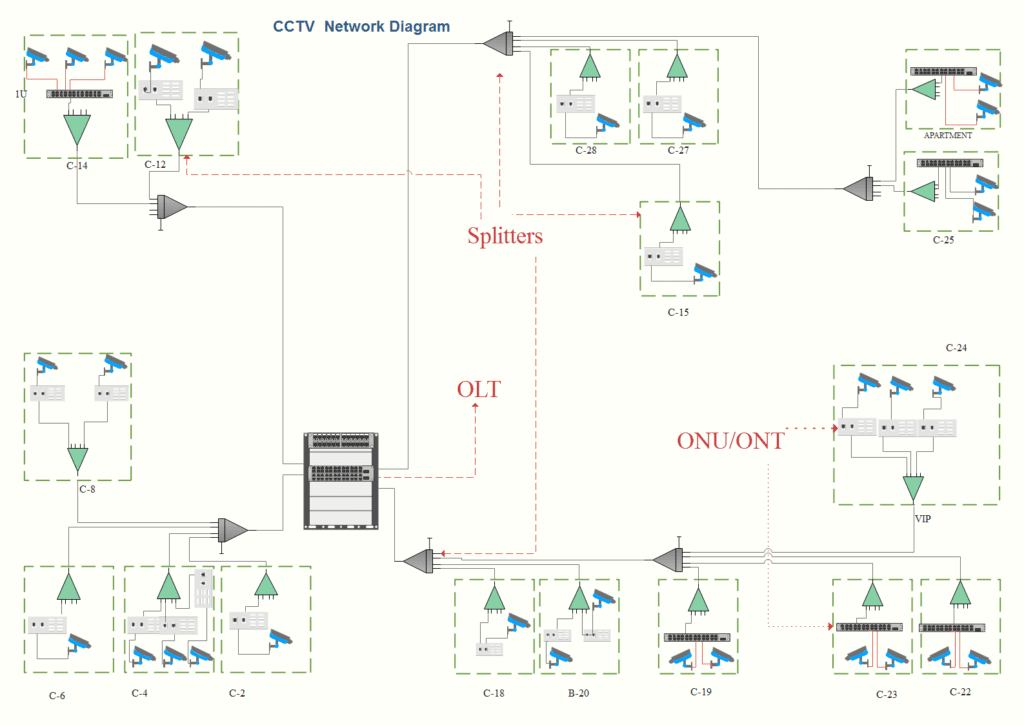
- Optical line terminal (OLT): GPON begins with an Optical line terminal (OLT), which is a device that connects to the service provider’s network and transmits data to and from the optical network units (ONUs). The OLT converts electrical signals to optical signals and sends them over the fibre optic cable.
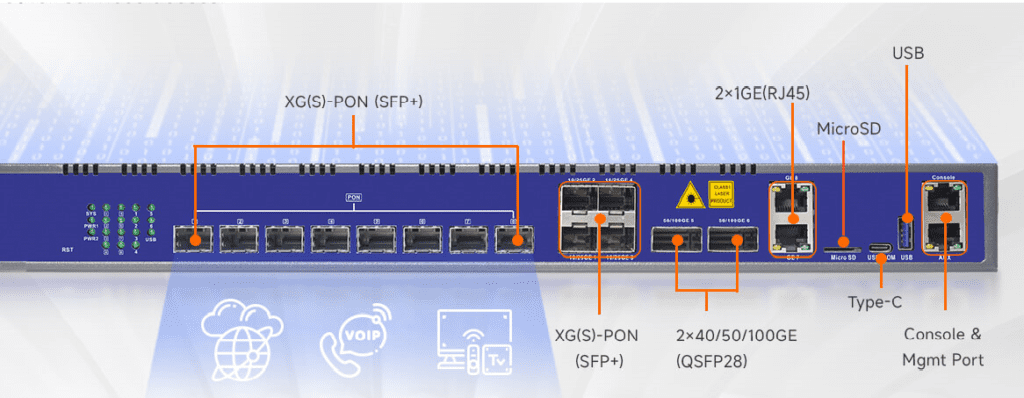
OLT OLT
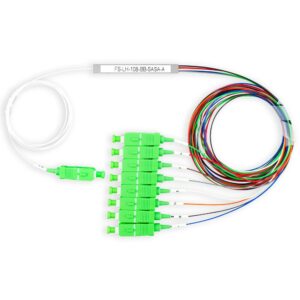
- Optical splitter: At the customer’s premises, the optical signal is split into multiple signals using an optical splitter. This allows the single fiber optic cable to be shared among multiple users.
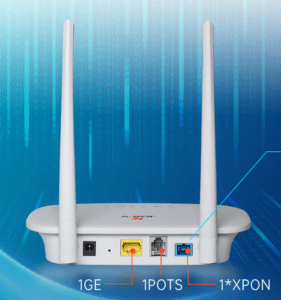
- Optical network unit (ONU): Each user has an optical network unit (ONU) installed at their premises. The ONU receives the optical signal from the optical splitter and converts it back to an electrical signal.
- Upstream and downstream signals: GPON uses two different wavelengths to transmit data: a downstream wavelength (1490 nm) and an upstream wavelength (1310 nm). The downstream signal carries data from the OLT to the ONUs, while the upstream signal carries data from the ONUs back to the OLT.
-
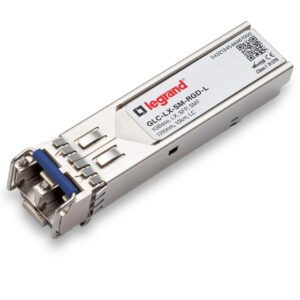
SFP Modules - Point-to-multipoint topology: GPON uses a point-to-multipoint topology, which means that the OLT can communicate with multiple ONUs simultaneously using a single fiber optic cable. This reduces the need for additional cabling and improves network efficiency.
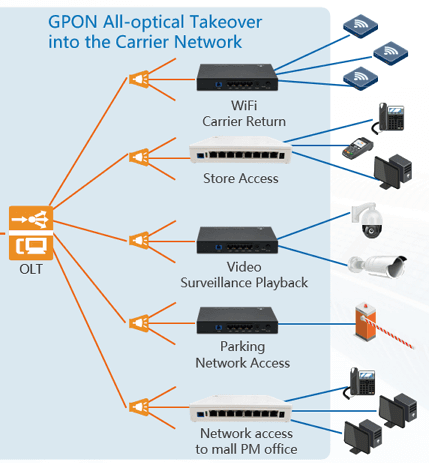
Point to Multipoint
- Quality of service (QoS): GPON supports quality of service (QoS) features, which allow service providers to prioritize certain types of traffic, such as voice or video data, to ensure that they are delivered with low latency and high reliability.
Conclusion
GPON is a powerful and versatile technology that can be used for a wide range of applications, including CCTV systems. It offers high-speed data transmission, long-distance connectivity, and other benefits that make it an ideal choice for many organizations.
How CCTV Traffic Flows on a GPON Network
GPON carries 2.488 Gbps downstream and 1.244 Gbps upstream on each PON port, and that capacity is shared by every ONU on the same splitter tree. In most CCTV systems the NVRs or VMS servers sit at the head end next to the OLT, while the cameras sit behind ONUs in the field. That means almost all video travels upstream, from ONU to OLT. The upstream direction, not the headline gigabit figure, is what you must size.
Upstream time slots are shared using T-CONTs and dynamic bandwidth allocation (DBA). For a security network, assign the CCTV service a T-CONT with assured bandwidth so that camera streams are not squeezed by other services on the same PON, and carry CCTV in its own VLAN from ONU to OLT.
Worked Example: Sizing One PON Port
A residential compound has 32 villas on one PON port with a 1:32 splitter. Each villa ONU feeds 4 cameras. Each camera sends a 4 Mbps main stream to the NVR, and one sub-stream of about 0.5 Mbps is viewed live at a time.
| Item | Calculation | Result |
|---|---|---|
| Per ONU | 4 cameras × 4 Mbps + 0.5 Mbps | 16.5 Mbps |
| Per PON port | 32 ONUs × 16.5 Mbps | 528 Mbps |
| Upstream capacity | 1.244 Gbps line rate, less protocol overhead | roughly 1.1 Gbps usable |
| Utilisation | 528 / 1100 | about 48% |
About half the upstream capacity is used, which leaves room for intercom, access control and growth. If the same compound used 8 MP cameras at 8 Mbps, the load would roughly double and approach the limit; in that case split the villas across two PON ports. Take real bitrates from the camera settings, because codec, frame rate and scene activity change them.
Optical Power Budget
GPON optics are sold in classes. Class B+ supports about 28 dB of loss between OLT and ONU, and Class C+ about 32 dB. A typical budget for the example above, using common typical values, looks like this:
| Item | Typical loss |
|---|---|
| 1:32 PLC splitter | about 17 dB (check the splitter data sheet) |
| 3 km of single-mode fiber at 1310 nm (0.35 dB/km) | about 1.05 dB |
| 4 mated connector pairs (0.3 dB each) | 1.2 dB |
| 4 fusion splices (0.1 dB each) | 0.4 dB |
| Total | about 19.7 dB |
Against a Class B+ budget of 28 dB, this leaves around 8 dB of margin for ageing and repairs. The splitter is by far the largest loss, which is why the split ratio is the first decision in a GPON design. GPON links normally use SC/APC connectors, and APC and UPC connectors must never be mated together.
Powering the Cameras
The fiber network itself is passive between the OLT and the ONUs, but the ONUs and the cameras still need power at every location. Options include ONUs with built-in PoE ports, or a standard ONU feeding a small PoE switch. Either way, each ONU location needs a mains supply and, for a security system, a UPS so cameras keep recording during a power cut. Plan this early, because it often decides where ONUs can go.
GPON or Active Ethernet for CCTV?
| GPON | Active Ethernet (switches with fiber uplinks) | |
|---|---|---|
| Fiber use | One feeder fiber serves many ONUs | A fiber pair or BiDi fiber per switch link |
| Field equipment | Passive splitters, no power | Powered switches in every cabinet |
| Upstream capacity | Shared 1.244 Gbps per PON port | Dedicated 1 or 10 Gbps per link |
| Best fit | Many low-bandwidth endpoints spread over a large area | Dense, high-bandwidth camera clusters |
For a compound, campus or road network with scattered cameras, GPON can save fiber and active cabinets. For a large warehouse or stadium with hundreds of high-resolution cameras in one building, active Ethernet usually gives more headroom.
Resilience
A single feeder fiber is a single point of failure for every ONU on that splitter. For critical CCTV, consider Type B protection, which uses two OLT PON ports and two diverse feeder fibers to a 2:N splitter, so a cut on one route does not take the cameras down. Keep the OLT, core switch and NVRs on UPS power as well.
Commissioning Checks
- Measure received power at each ONU with a PON power meter at 1490 nm and record it. The value must sit between the ONU's sensitivity and overload limits from its data sheet, with margin.
- Confirm every ONU registers on the OLT with the expected serial number and profile.
- Check the CCTV VLAN and T-CONT bandwidth on the OLT, then confirm on the NVR that all cameras record at the expected bitrate.
- Test a fiber cut or ONU power loss and confirm the NVR raises a video-loss alarm.
Frequently Asked Questions
Can I connect IP cameras directly to an ONU?
Yes, if the ONU has Ethernet ports, and PoE if the cameras need it. Each camera then uses an ONU port, so check the ONU's port count and PoE budget.
Does GPON add delay to live video?
GPON adds very little delay compared with video encoding and decoding, so operators normally do not notice it.
Can CCTV share a GPON network with internet and IPTV?
It can, using separate VLANs and services on the OLT, but give CCTV assured upstream bandwidth and keep its traffic isolated. Many security projects still prefer a dedicated PON or OLT for the security systems.
To check the optical budget for your own split ratio and distances, use the free Fiber Optic Loss Budget Calculator, and see How to Calculate Network Bandwidth for camera bitrates.