
Most people think the card reader on the wall is the access control system. It is only the part you can see. Behind it sit a controller, a lock, a power supply, door sensors, an exit device, cabling and software, and each must be right for the door to work safely. This guide explains the access control system components one by one: what each part does, how they connect and what to check before you buy or install.
Quick answer: A typical access control system has seven core components: the credential (card, PIN, fingerprint, face or phone), the reader, the door controller, the electric lock, the door monitoring and exit devices (door contact, REX button and emergency break glass), the power supply with backup battery, and the management software on a server or in the cloud. The controller makes the decision at the door; the software only manages users, rules and reports.
How the Components Work Together
Follow one person through one door:
- A user presents a credential (a card, a finger, a face or a phone) to the reader.
- The reader sends the credential number to the door controller, usually over Wiegand (D0/D1) or OSDP (RS-485).
- The controller checks its local database: is this user valid, on this door, at this time?
- If yes, the controller switches its lock relay and the electric lock releases for a few seconds.
- The door contact confirms the door opened and closed again. If it stays open too long, the controller raises a “door held open” alarm.
- The event goes over the network to the software, where it is stored and can be reported or linked to CCTV.
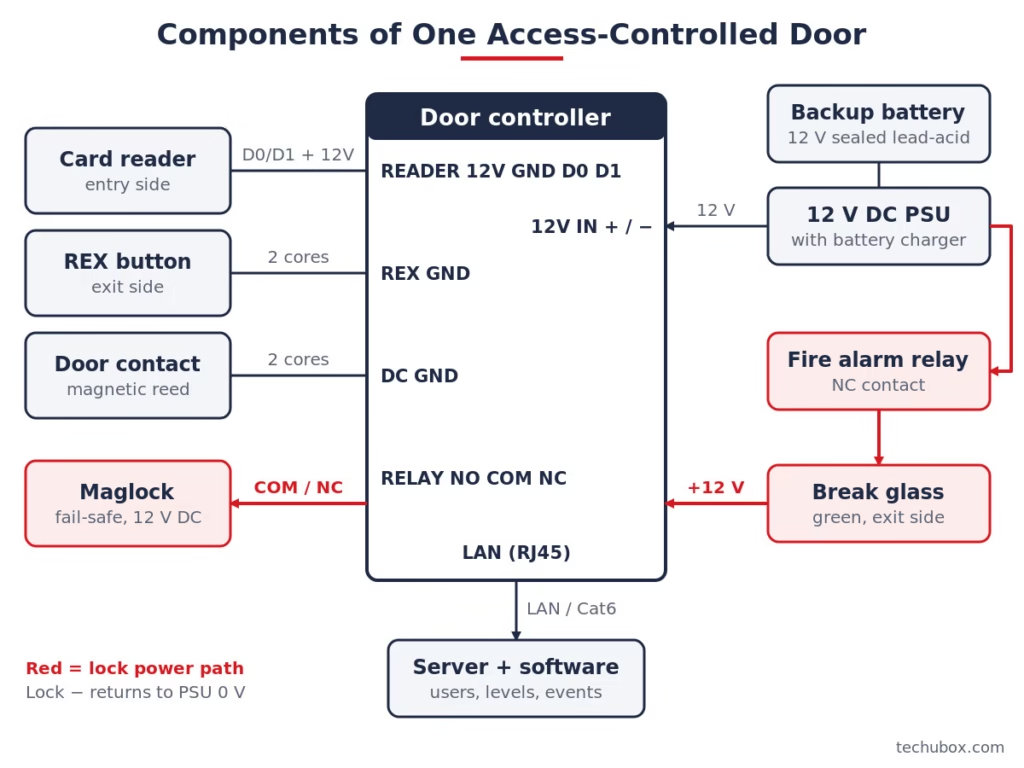
Going out, the user presses the REX (request to exit) button or a PIR detects them, and the lock releases without an alarm. In an emergency, the break glass or fire alarm relay cuts lock power directly.
Access Control System Components at a Glance
| Component | What it does | Typical spec | Field note |
|---|---|---|---|
| Credential | Identifies the user | 125 kHz prox, 13.56 MHz smart card, PIN, biometric, mobile | Avoid plain 125 kHz prox on new sensitive sites; it is easy to copy |
| Reader | Reads the credential, sends it to the controller | 12 V DC, Wiegand or OSDP | Prefer OSDP with Secure Channel where the controller supports it |
| Door controller | Decides access, drives the lock, logs events | 1, 2 or 4 doors; relays NO/COM/NC; inputs for REX and door contact | Must keep working if the network or server goes down |
| Electric lock | Holds the door | Maglock, electric strike, electric mortise lock; 12 or 24 V DC | Choose fail-safe or fail-secure based on the escape route |
| Door contact | Reports door open or closed | Magnetic reed switch, dry contact | Without it you get no “forced” or “held open” alarms |
| REX device | Requests exit | Push button (often touchless) or PIR sensor | On maglock doors, add a push button that cuts lock power directly |
| Emergency release | Releases the door in an emergency | Green break glass, double-pole | Wire it in the lock power, not just as a controller input |
| Power supply + battery | Powers locks, readers and controller | 12 or 24 V DC PSU with charger, sealed lead-acid battery | Size for the total load plus battery charging |
| Software | Users, access levels, schedules, reports | On-premises server, cloud or hybrid | Back up the database and keep it patched |
1. Credentials: Cards, PINs, Biometrics and Mobile
The credential is whatever proves who you are. The main families are:
- 125 kHz proximity cards and fobs (EM, HID Prox and similar). Cheap and common, but they only carry a number with no encryption, so they can be cloned with low-cost tools.
- 13.56 MHz smart cards such as MIFARE DESFire, iCLASS SE and Seos. Encrypted, and the normal choice for new sensitive buildings. The old MIFARE Classic chip is no longer considered secure.
- PIN codes, usually on a keypad reader, often combined with a card for two-factor entry to server rooms.
- Biometrics: fingerprint, face and sometimes palm or iris. Nothing to lose or share, but personal data must be handled properly.
- Mobile credentials on a phone using Bluetooth or NFC. Increasingly popular for offices and multi-site companies.
We compare the card technologies in detail in Access Control Card Types: 125 kHz Prox vs MIFARE vs DESFire vs iCLASS, and biometrics in Fingerprint vs Face Recognition.
2. Readers and the Reader Protocol
The reader is usually mounted 900 to 1,200 mm above finished floor level (follow the project drawings). It must match your card technology. A multi-technology reader (125 kHz and 13.56 MHz) helps when migrating an old site.
How the reader talks to the controller matters as much as what it reads:
- Wiegand uses two data lines, D0 and D1, plus 12 V and ground, often with extra cores for LED and buzzer. It is one-way and not encrypted. The common 26-bit format carries an 8-bit facility code and 16-bit card number. Cable length is typically around 150 m.
- OSDP (Open Supervised Device Protocol) runs on RS-485 (terminals A and B) with power on a second pair. It is two-way, supervised, supports AES-128 Secure Channel encryption and allows much longer runs, typically up to about 1,200 m. It was published as the international standard IEC 60839-11-5 in 2020.
Pro tip: Check the controller before you buy OSDP readers. An OSDP reader on a Wiegand-only controller will not work, and “supports OSDP” on a datasheet does not always mean Secure Channel is supported. The full comparison is in Wiegand vs OSDP.
3. The Door Controller: The Brain at the Door
The controller (also called the access control panel or ACU) is the most important component and the one people think about least. A good controller:
- Stores the user database and access rules locally, so doors keep working if the server or network fails.
- Has reader ports (Wiegand and/or RS-485), inputs for REX and door contact, and relay outputs marked NO, COM and NC for the lock.
- Buffers events while offline and uploads them when the link returns.
- Has a tamper switch on its enclosure and is mounted on the secure side of the door, never outside.
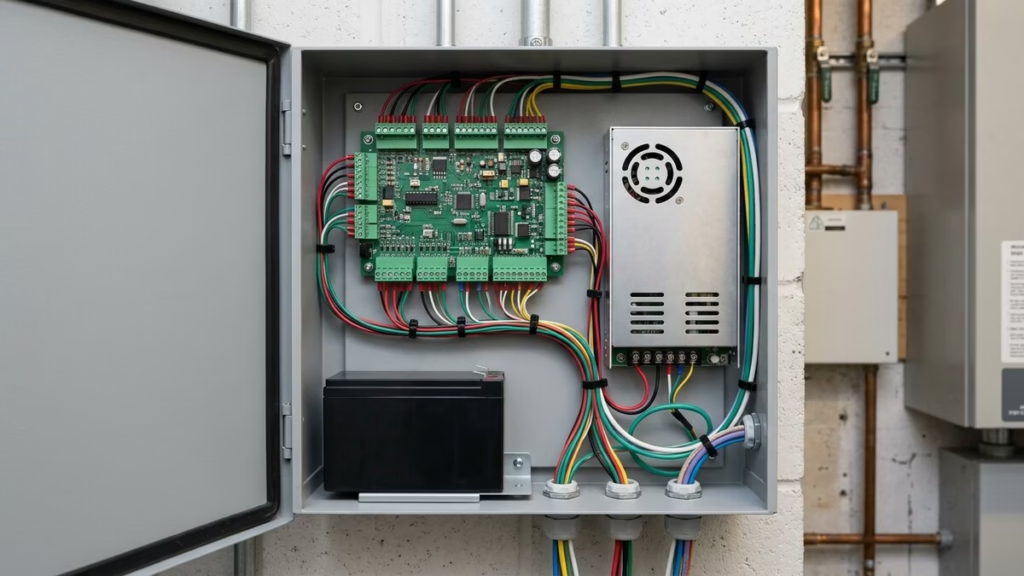
Controllers come in 1-door, 2-door and 4-door sizes; a 2-door model often has four reader ports for entry and exit readers. Edge devices combine reader and controller in one box. They suit low-risk doors, but if mounted outside, the lock relay sits on the unsecure side, so add a secure relay module inside.
4. Electric Locks: Maglock, Strike and Electric Mortise
The lock is where most site problems start. The three common types:
- Electromagnetic lock (maglock): holds the door with a magnet. Always fail-safe (unlocks when power is removed). Common holding forces are around 280 kg (600 lb) for single doors. Typical current is about 0.5 A at 12 V or 0.25 A at 24 V, but check the datasheet.
- Electric strike: replaces the strike plate in the frame. Available as fail-safe or fail-secure. The door handle on the inside still opens the door mechanically, which gives free egress.
- Electric mortise lock / electrified lockset: the lock mechanism itself is motorised or solenoid-driven. Neat and secure, but needs a power transfer hinge or door loop.
Fail-safe means unlocked when power is lost; fail-secure means locked when power is lost. On an escape route, the local fire authority usually expects either fail-safe locking or free mechanical egress. Detailed guidance is in Fail-Safe vs Fail-Secure Locks and Maglock vs Electric Strike.
My field advice: fit a diode (or the lock’s built-in suppressor) across every DC lock coil. The back-EMF spike at switch-off can weld relay contacts and reset controllers.
5. Door Contacts, REX Devices and Emergency Release
- Door contact (door position switch): a magnetic reed switch on the frame and a magnet on the door. It lets the controller detect “door forced open” (opened without a valid card or REX) and “door held open”.
- REX button or PIR: tells the controller a person is leaving, so it releases the lock and suppresses the forced-door alarm. On maglock doors, many codes and specifications expect a manual push button that also cuts lock power directly, not only a PIR.
- Emergency break glass: a green call point on the exit side. It should break lock power directly through its own contacts, so it works even if the controller has failed. A double-pole unit also signals the controller for logging.
Wiring for these devices is shown step by step in our REX button and door contact wiring guide and the full access control wiring diagram.
6. Power Supply and Backup Battery
Most access control runs on 12 V DC or 24 V DC from a switch-mode power supply with a built-in battery charger. A sealed lead-acid battery keeps the doors working during a mains failure. Good practice:
- Size the PSU for the total current of the controller, readers and locks, plus about 25% margin, plus the battery charging current.
- Choose standby hours from the project specification. Four hours is a common minimum on commercial jobs, but some specifications ask for more.
- Use a PSU with fault outputs (mains fail, battery low) and wire them to controller inputs, so you know the battery is flat before the doors fail.
- Feed the PSU from a dedicated, labelled spur, ideally from an essential or UPS-backed distribution board.
Use our Battery Backup Calculator for the battery size and the Voltage Drop Calculator for long lock cables.
7. Software, Server and Network
The software is where you enrol users, create access levels and time schedules, see live events and run reports. It comes in three forms:
- On-premises: installed on a local PC or server. You back it up and patch it.
- Cloud: hosted by the vendor and managed through a browser or app. Suits multi-site companies; usually a subscription.
- Hybrid: controllers on site, management in the cloud.
Controllers usually connect over the building LAN with Cat6. Put access control on its own VLAN, change default passwords and keep firmware updated. Our Cat5e vs Cat6 vs Cat6A guide covers the cable choice. For brand-level comparisons of software platforms, see Best Access Control Systems Compared.
Integrations: Fire Alarm, CCTV, Lifts and BMS
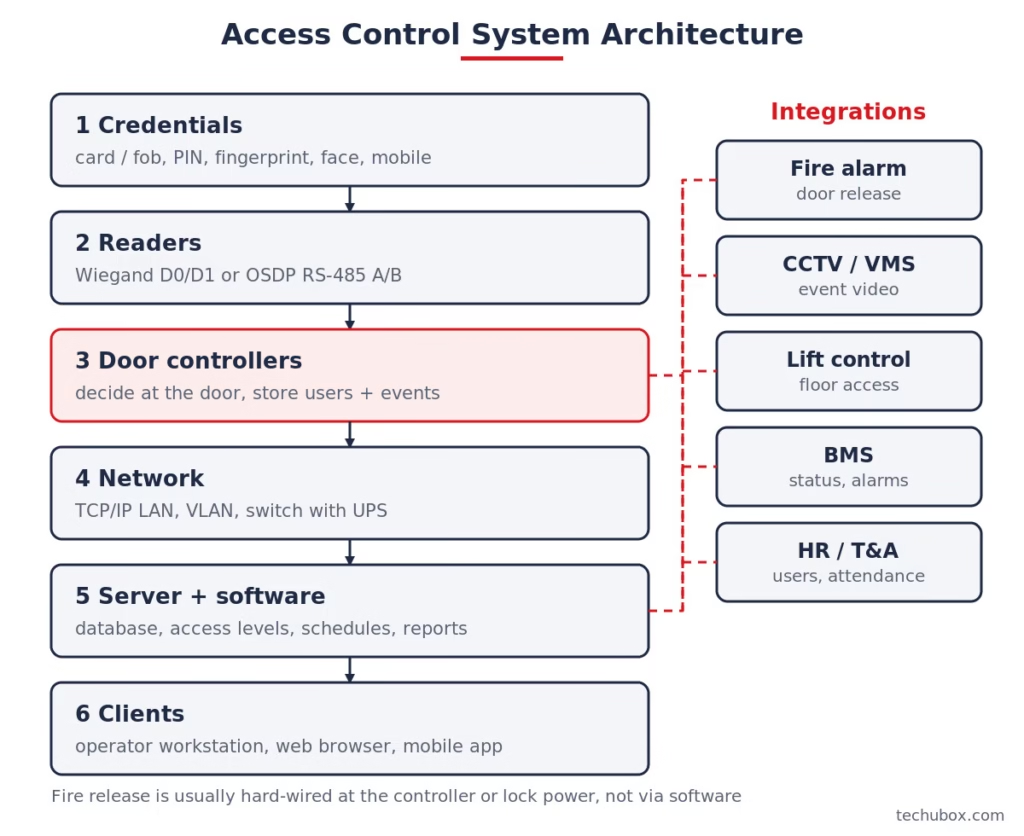
An access control system rarely works alone. The most common links are:
- Fire alarm: a relay from the fire alarm system releases fail-safe locks on escape routes. In Saudi Arabia this is checked against SBC 801 and Civil Defense requirements; elsewhere NFPA 101 or BS 7273-4 are common references. See Access Control and Fire Alarm Integration and our fire alarm integration with BMS, access control and CCTV guide.
- CCTV: pop-up video on door alarms and searchable footage for every access event. See Access Control and CCTV Integration.
- Lifts: restrict which floors a card can select. See how to connect access control to the elevator.
- BMS: door status to the BMS. See why CCTV alone is no longer enough.
Practical Example: Components for One Office Door
A single glass office door with a card reader outside and a push-to-exit button inside. The controller cabinet is in the comms room, 30 m away by cable route.
Step 1: List the components. One card reader (13.56 MHz), one single-door controller, one 280 kg maglock (fail-safe, 12 V DC), one door contact, one touchless REX button, one green break glass, one 12 V DC PSU with battery, and the fire alarm relay input.
Step 2: Add up the current (typical values, check your datasheets).
- Controller: 0.25 A
- Reader: 0.10 A
- Maglock: 0.50 A
- REX button illumination: 0.02 A
- Total: 0.25 + 0.10 + 0.50 + 0.02 = 0.87 A
Step 3: Size the PSU. 0.87 A x 1.25 margin = 1.09 A. Add battery charging current and choose a 2 A unit.
Step 4: Size the battery for 4 hours. 0.87 A x 4 h = 3.48 Ah. Multiply by 1.25 for battery ageing: 3.48 x 1.25 = 4.35 Ah. The next standard size is 12 V 7 Ah.
Step 5: Check voltage drop on the lock cable. 30 m run = 60 m of conductor. 1.0 mm² copper is about 0.0181 ohm/m, so R = 60 x 0.0181 = 1.09 ohm. Drop = 0.5 A x 1.09 ohm = 0.54 V, leaving about 11.46 V at the maglock (4.5% drop), which is acceptable. On 0.5 mm² the drop doubles, so I would not go thinner.
Step 6: Cables. Reader: 6-core screened 0.22 mm² (Wiegand) or 2-pair screened twisted (OSDP). Lock: 2-core 1.0 mm². REX and door contact: 2-core each. Break glass: 4-core 1.0 mm². Controller to switch: Cat6.
You can lay out doors and generate a component list with the Access Control Designer. For a full building, follow our guide on how to design an access control system.
Common Mistakes and Troubleshooting
| Symptom | Likely cause | Fix |
|---|---|---|
| Reader beeps but door does not open | Lock wired to NO instead of NC (or the reverse), or no lock power | Fail-safe maglock on COM/NC, fail-secure strike on COM/NO; measure voltage at the lock |
| Wrong card number in software | Wiegand format mismatch (for example 26-bit vs 34-bit) | Set the same format on reader and controller |
| Constant “door forced open” alarms | Door contact misaligned or REX not wired to controller | Realign magnet and reed; wire REX output to the REX input |
| Controller resets when lock releases | No suppression diode, shared undersized supply | Fit diode across lock; separate lock and controller supplies |
| Doors stay locked in fire alarm | Fire relay wired to controller input only | Break lock power directly through the fire alarm relay contact |
| Maglock weak or buzzing | Voltage drop, dirty or misaligned armature plate | Check voltage at lock, thicker cable or 24 V, clean and align plate |
For hands-on installation steps, see How to Install a Door Access Control System.
Frequently Asked Questions
What are the main components of an access control system?
Credentials, readers, door controllers, electric locks, door contacts and exit devices, a power supply with backup battery, and management software.
What is the difference between a reader and a controller?
The reader only reads the card, finger or face and passes the data on. The controller decides whether to grant access, switches the lock and records the event.
Does an access control system work if the server is down?
With a proper networked controller, yes. The controller stores users and rules locally and keeps opening doors. Some cloud-only edge devices differ, so check.
Which lock is best for an access-controlled door?
It depends on the door and escape route. Maglocks suit glass and aluminium doors and are always fail-safe. Electric strikes suit timber and steel doors with a lever handle and can be fail-secure for storerooms and server rooms.
What voltage do access control systems use?
Most use 12 V DC or 24 V DC. Use 24 V for long lock cable runs or high-current locks, because the current halves and voltage drop is much lower.
Why do I need a door contact if I already have a lock?
The lock only holds the door; it cannot tell the system whether the door is actually closed. The door contact reports door forced open and door held open alarms and is needed for anti-passback and CCTV event linking.