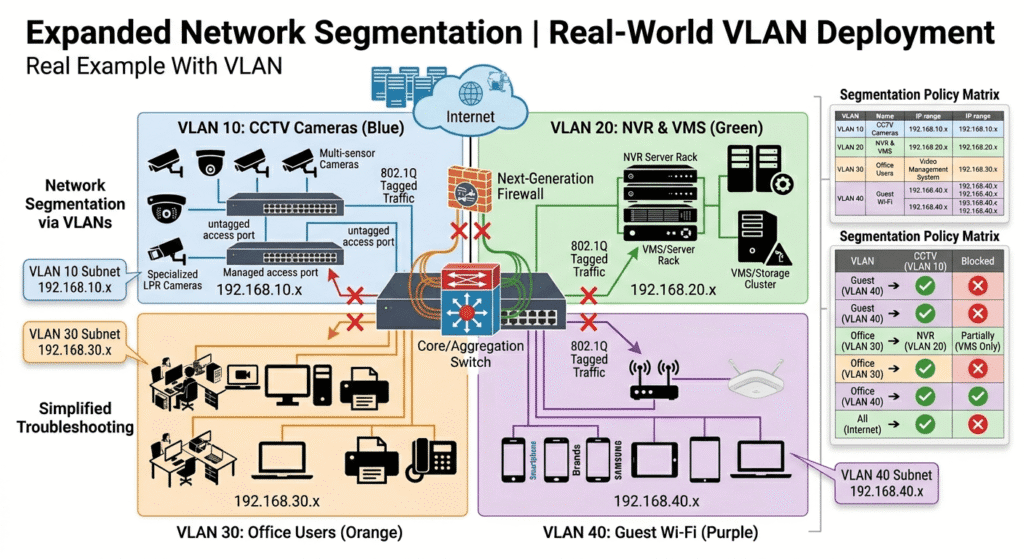
The Complete Practical Guide for Integrators and Engineers
Modern CCTV systems have evolved far beyond simple cameras and recorders connected by basic cabling. Today’s surveillance networks are intelligent, highly scalable, and heavily dependent on robust network design. One of the most critical technologies underpinning a stable and secure CCTV network is the Virtual Local Area Network (VLAN).
If your work involves IP cameras, Network Video Recorders (NVRs), Power over Ethernet (PoE) switches, monitoring stations, or enterprise-level security systems, a deep understanding of VLANs is no longer optional—it is essential. This comprehensive guide explains VLANs from the ground up in a practical, accessible manner tailored specifically for CCTV projects. Whether you are a novice technician or a seasoned system integrator, this article will equip you with the knowledge to design cleaner, safer, and more professional surveillance networks.
What Exactly Is a VLAN?
VLAN stands for Virtual Local Area Network. In essence, a VLAN allows network administrators to logically divide a single physical network switch into multiple separate, isolated networks. Even when various devices are physically connected to the same switch, VLANs can effectively isolate traffic between different departments, systems, or device types.
Consider a VLAN as creating separate, secure rooms within a single building. In this analogy, the cameras reside in one room, office computers in another, servers in a third, and guest devices in a completely separate area. Despite sharing the same underlying infrastructure, these devices remain logically separated, ensuring that their communications do not interfere with one another.
The Critical Importance of VLANs in CCTV Systems
Operating a CCTV system without VLANs means that surveillance traffic mixes freely with general office traffic, printer communications, Wi-Fi user data, and internet browsing. This lack of segmentation introduces several significant challenges that can compromise both performance and security.
Problems Without VLANs in CCTV
When all devices operate on a single, flat network, the high bandwidth demands of IP cameras can quickly overwhelm the infrastructure. This high bandwidth usage often leads to slow network performance for office users and potential video lag or frame drops for the surveillance system. Mixing traffic creates severe security risks. Broadcast storms can disrupt network stability, and the lack of isolation means that malware from an office PC could potentially reach the cameras. Additionally, unauthorised users might easily access camera IP addresses, and troubleshooting network issues becomes a complex, time-consuming task. VLANs provide a professional solution to these issues by enforcing strict logical separation.
VLAN in Action: Before & After Examples
To illustrate the impact of VLANs, let us examine a typical network scenario before and after implementation.
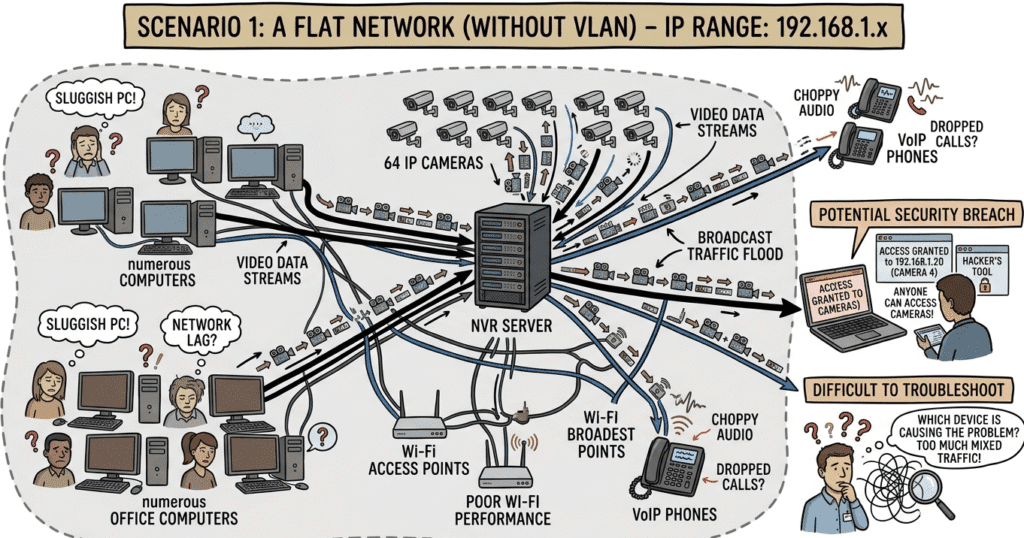
Scenario 1: A Flat Network (Without VLAN)
Imagine a network comprising 64 IP cameras, numerous office computers, Wi-Fi access points, VoIP phones, and an NVR server. If all these devices are connected in one flat network (e.g., using the IP range 192.168.1.x), the problems become immediately apparent. The continuous stream of video data from the cameras floods the network, causing office PCs to become sluggish. Security is compromised as anyone on the network can potentially access the camera IPs, and identifying the source of a network issue becomes incredibly difficult amidst the mixed traffic.
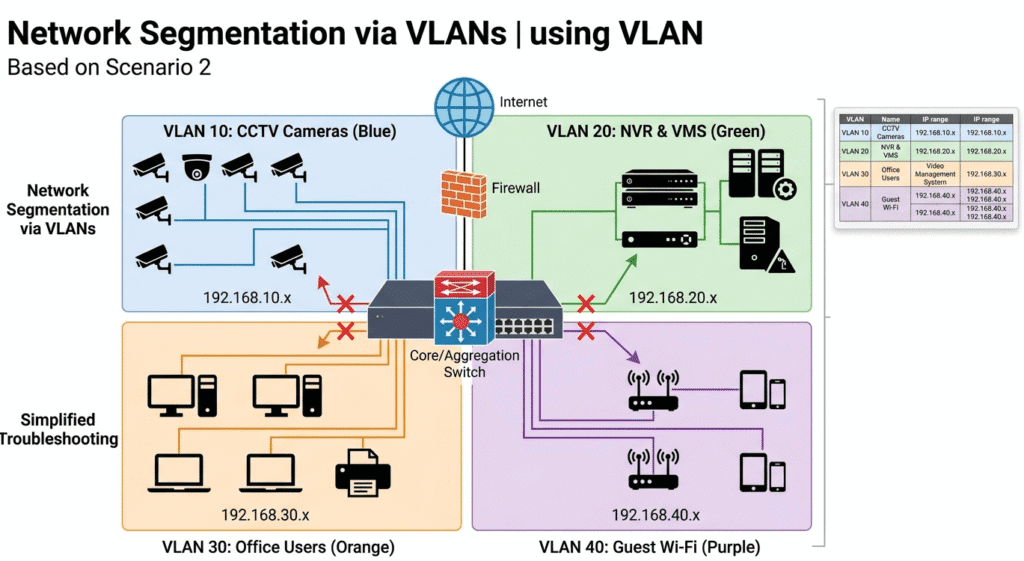
Scenario 2: A Segmented Network (With VLAN)
Now, consider the same network divided using VLANs. By assigning specific purposes and IP ranges to different VLANs, the network becomes structured and manageable.
With this architecture, the network becomes significantly cleaner and faster. Security is vastly improved because office users and guests cannot directly access the CCTV infrastructure. Furthermore, managing the network and troubleshooting specific issues becomes a straightforward process.
Understanding VLAN Fundamentals
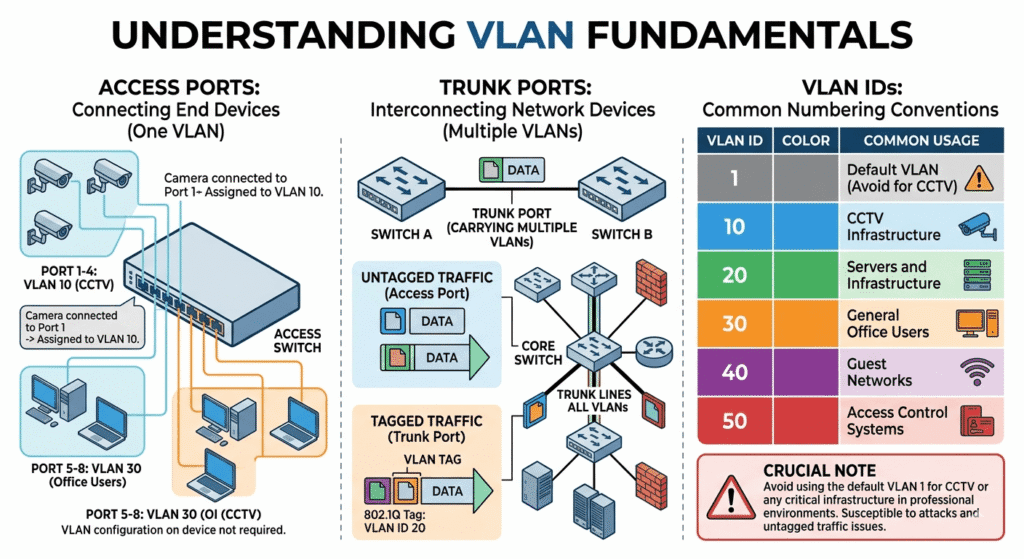
To effectively implement VLANs, it is crucial to understand the basic terminology and concepts associated with switch port configurations and VLAN identification.
Access Ports: Connecting End Devices
An access port is configured to belong to only one specific VLAN. It is typically used to connect end devices, such as cameras or computers, to the switch. For example, if a camera is connected to port 1, and port 1 is assigned to VLAN 10, the camera automatically becomes part of VLAN 10 without requiring any VLAN configuration on the camera itself.
Trunk Ports: Interconnecting Network Devices
A trunk port is designed to carry traffic for multiple VLANs simultaneously. This type of port is essential when connecting network devices together, such as linking multiple switches, connecting a core switch to a managed PoE switch, or connecting a switch to a firewall or router. Trunk ports ensure that VLAN tags are preserved as traffic moves across the network backbone.
VLAN IDs: Identifying Your Virtual Networks
VLANs are identified by a numerical ID ranging from 1 to 4094. While you can choose almost any number within this range, it is helpful to establish a consistent numbering convention.
Crucial Note: It is a fundamental best practice to avoid using the default VLAN 1 for CCTV or any critical infrastructure in professional environments, as attackers often target it and can be susceptible to untagged traffic issues.
Practical CCTV VLAN Design Examples
The complexity of your VLAN design will scale with the size of the deployment. Here are two practical examples illustrating how VLANs can be structured.
Small Office CCTV System VLAN Plan
For a small office environment with 16 IP cameras, one NVR, a single PoE switch, and a router, a simple VLAN plan is highly effective.
The result of this straightforward segmentation is that office users cannot directly access the cameras, and the heavy CCTV traffic remains isolated from general office communications.
Enterprise CCTV System VLAN Structure
In a large building or enterprise environment featuring 128 cameras, a core switch, multiple PoE access switches, Video Management System (VMS) servers, and a dedicated security control room, a more granular approach is required.
This structured approach significantly improves security by compartmentalising different camera types and user roles. It also enhances scalability, performance, and the ability to troubleshoot complex issues rapidly.
Key Advantages of Implementing VLANs in CCTV
The benefits of deploying VLANs in a surveillance network extend far beyond simple organization. They are fundamental to creating a robust and reliable system.
1. Enhanced Security: By isolating the CCTV network, users from the general office LAN or guest networks cannot directly access the cameras or recording equipment, mitigating the risk of unauthorized viewing or tampering.
2. Reduced Broadcast Traffic: IP cameras generate a substantial amount of network packets. VLANs contain broadcast traffic within their specific logical network, preventing it from flooding the entire infrastructure and degrading overall performance.
3. Simplified Troubleshooting: When network issues arise, VLANs allow engineers to isolate problems faster. If a camera goes offline, the investigation can be focused solely on the CCTV VLAN rather than the entire corporate network.
4. Improved Performance: By separating high-bandwidth video streams from other network activities, overall network congestion is significantly lowered, ensuring smooth video transmission and responsive office applications.
5. Professional Network Organisation: VLANs enforce a structured, logical architecture, transforming a chaotic mix of devices into a professionally managed and easily understandable system.
Managed vs. Unmanaged Switches: The Right Choice for CCTV
When building a CCTV network, the choice of switch is critical. Unmanaged switches are basic, plug-and-play devices that are inexpensive but offer no support for VLANs or advanced configuration. They are suitable only for the most basic, isolated setups.
In contrast, managed switches are strongly recommended for all professional CCTV projects. They support essential features such as VLAN configuration, Quality of Service (QoS) for prioritising video traffic, Simple Network Management Protocol (SNMP) for monitoring, port mirroring for diagnostics, and advanced security policies. Investing in managed switches is a prerequisite for a secure and scalable surveillance network.
Popular Switch Brands for CCTV VLAN Implementations
Several reputable manufacturers provide robust managed switches suitable for CCTV deployments. Popular choices among integrators include D-Link, Cisco, TP-Link, Ubiquiti, MikroTik, Hikvision, and Dahua Technology.
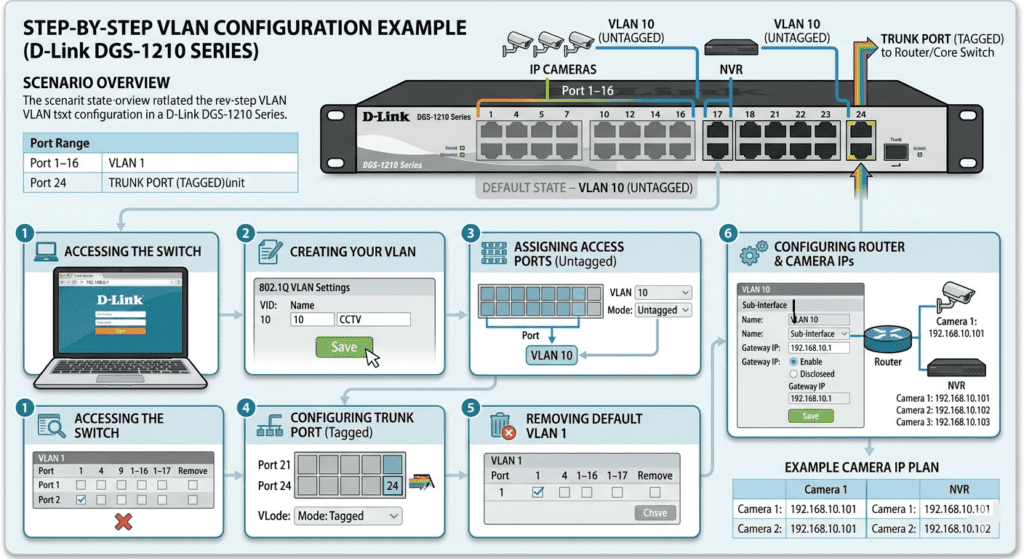
Step-by-Step VLAN Configuration Example (D-Link DGS-1210 Series)
While the exact graphical user interface (GUI) will vary depending on the switch manufacturer and model, the fundamental process of configuring a VLAN remains consistent. The following is a practical example using a D-Link DGS-1210 Series switch.
Scenario Overview
We aim to configure the switch to support both cameras and an uplink to a router, separating the CCTV traffic onto VLAN 10.
Configuration Steps
Step 1: Accessing the Switch Interface
Begin by logging into the switch. The default IP address is often 192.168.0.1. Open a web browser, navigate to http://192.168.0.1, and log in using the administrator credentials.
Step 2: Creating Your VLAN
Navigate to the VLAN configuration section, typically found under L2 Features → VLAN → 802.1Q VLAN. Click on Add VLAN and create a new entry with a VLAN ID of 10 and a descriptive name such as CCTV. Save the configuration.
Step 3: Assigning Access Ports (Untagged )
Assign ports 1 through 17 to VLAN 10. Set the mode for these ports to Untagged. This configuration ensures that the connected cameras and NVR do not need to be aware of the VLAN; the switch handles the tagging internally.
Step 4: Configuring the Trunk Port (Tagged)
Port 24 serves as the connection to the router or core switch. Configure this port as Tagged on VLAN 10. This setting allows traffic associated with VLAN 10 to pass between devices while maintaining its VLAN identification.
Step 5: Removing Default VLAN 1 from Camera Ports
This is a critical security step. Ensure that ports 1 through 17 are explicitly removed from the default VLAN 1. This action prevents any potential mixing of traffic and secures the isolated network.
Step 6: Configuring the Router Interface for Inter-VLAN Communication
Finally, configure the router to handle the new VLAN. For example, set the gateway for VLAN 10 to 192.168.10.1. The cameras will now operate within the 192.168.10.x subnet.
Example Camera IP Plan
Essential Best Practices for CCTV VLAN Deployment
To ensure the long-term stability and security of your surveillance network, adhere to these industry best practices.
Dedicated VLANs for Cameras: Never mix CCTV traffic with the general office LAN. Always use a dedicated VLAN for surveillance equipment.
Static IP Addresses for Reliability: Avoid using DHCP for critical security systems. Assign static IP addresses to all cameras, NVRs, and related infrastructure to ensure consistent connectivity.
Leverage PoE Managed Switches: Utilising PoE managed switches simplifies deployment by providing both power and data over a single cable while offering the necessary management features.
Comprehensive Documentation & Labelling: Maintain meticulous documentation. Record all VLAN IDs, IP ranges, switch port assignments, and device names. Physical labelling of cables and ports is also highly recommended.
Prioritize Video Traffic with QoS: Enable Quality of Service (QoS) on your switches to prioritize CCTV video traffic, ensuring smooth playback even during periods of high network utilization.
VLAN and Power over Ethernet (PoE): A Synergistic Duo
It is important to note that configuring a VLAN does not affect Power over Ethernet (PoE) delivery. The switch will continue to provide power normally to connected devices, such as IP cameras, while simultaneously isolating their data traffic logically.
Inter-VLAN Routing: Enabling Controlled Communication
In many scenarios, users on one VLAN (e.g., security operators on the office VLAN) need to access resources on another (e.g., the NVR on the CCTV VLAN). This controlled communication requires inter-VLAN routing, which is typically handled by a Layer 3 switch or through specific firewall rules on a router. For example, you might configure rules that allow the Office VLAN to access the NVR’s IP address but explicitly block direct access to the individual cameras.
Avoiding Common VLAN Mistakes in CCTV
Even experienced technicians can make errors during VLAN configuration. Be mindful of these common pitfalls.
Neglecting VLAN 1 Isolation: Leaving all devices in the default VLAN 1 is a frequent beginner mistake that negates the security benefits of network segmentation.
Incorrect Tagged/Untagged Configuration: Applying the wrong tagging configuration can instantly disconnect devices from the network. Ensure access ports are untagged and trunk ports are tagged appropriately.
Lack of Documentation: Failing to maintain accurate network drawings and IP schemes makes future troubleshooting and expansion incredibly difficult.
Insufficient Gateway Planning: Without proper routing and gateway configuration, remote viewing and inter-VLAN communication will fail.
Troubleshooting VLAN Issues in CCTV Systems
When issues arise, a systematic approach to troubleshooting is essential.
Camera Offline: If a camera is unreachable, verify its VLAN assignment on the switch port, ensure it has the correct IP subnet and gateway configured, and check the trunk configuration if the traffic must cross multiple switches.
Cannot Access NVR: If the NVR is inaccessible from another network segment, investigate the inter-VLAN routing configuration, review firewall rules for blocked ports, and confirm the subnet mask settings.
Video Lag: Video performance issues often stem from bandwidth constraints. Check the overall network bandwidth, ensure QoS is properly configured to prioritize video, verify the uplink speed between switches, and confirm that the switch backplane capacity is sufficient for the traffic load.
Recommended CCTV VLAN Topology
A robust enterprise topology typically follows a hierarchical model. The internet connection feeds into a firewall, which connects to a core switch. The core switch then distributes connections to various access switches, each configured with specific VLANs (e.g., VLAN 10 for CCTV, VLAN 20 for servers, and VLAN 30 for office). This structure ensures security, scalability, and efficient traffic flow.
Advanced VLAN Security Recommendations for CCTV
For professional, high-security CCTV projects, implement these advanced measures:
•Disable all unused switch ports to prevent unauthorised physical access.
•Change all default passwords on switches, cameras, and NVRs immediately upon installation.
•Implement Access Control List (ACL) rules to strictly define which IP addresses can communicate with the surveillance network.
•Ensure guest Wi-Fi networks are completely isolated on their own VLAN.
•Block direct internet access to cameras; they should only communicate with the NVR or specific management servers.
•Require the use of a Virtual Private Network (VPN) for any remote access to the surveillance system.
VLANs vs. Physical Separation: Why VLANs Win
Some installers may question the need for VLANs, asking, “Why not just use completely separate physical switches for the cameras?” While physical separation is secure, VLANs offer significant advantages. They are generally more cost-effective, as they maximize the utilization of existing hardware. They are also far easier to scale; adding a new camera to a different area only requires a configuration change rather than running new cables to a separate switch. Furthermore, VLANs are easier to manage centrally and offer greater flexibility as organizational needs evolve.
When to Implement Multiple CCTV VLANs
While a single CCTV VLAN is sufficient for many installations, more complex environments require further segmentation. Consider implementing multiple CCTV VLANs when managing more than 100 cameras, spanning multiple buildings or geographical locations, dealing with different security clearance levels (e.g., public areas vs. highly restricted zones), operating in multi-tenant projects, or managing exceptionally high-traffic environments.
Conclusion: Elevate Your CCTV Network with VLANs
VLANs represent one of the most valuable and foundational technologies in modern CCTV infrastructure. A properly designed and implemented VLAN architecture provides your surveillance system with enhanced security, superior performance, easier maintenance, and professional-grade scalability.
Whether you are deploying a modest small office CCTV system or architecting a massive enterprise surveillance network, a thorough understanding of VLANs is what separates a basic installer from a professional systems engineer. For anyone working in the security systems industry, mastering VLAN configuration is an investment that will yield dividends on every future project.
Frequently Asked Questions (FAQs)
Can cameras communicate across VLANs?
Yes, but only if inter-VLAN routing is explicitly configured and allowed by a router or Layer 3 switch.
Can unmanaged switches use VLANs?
No. Unmanaged switches lack the necessary software and hardware capabilities to process VLAN tags. You must use managed or smart-managed switches.
Does VLAN improve video quality?
Indirectly, yes. By reducing network congestion and isolating broadcast traffic, VLANs ensure that video packets are delivered reliably, which prevents frame drops and lag, thereby maintaining high video quality.
Is VLAN difficult to configure?
It can seem daunting initially, but once you grasp the core concepts of access ports, trunk ports, and tagged versus untagged traffic, the configuration process becomes logical and straightforward.
Which VLAN is best for CCTV?
Any dedicated VLAN ID is suitable, provided it is not the default VLAN 1. A common industry choice is VLAN 10, but the specific number is less important than the principle of isolation.