
LPR, ANPR & UVSS Systems Complete Guide
A Complete Step-by-Step Guide for Beginners
Key Takeaways
What is LPR (licence plate recognition)?
What is ANPR (Automatic Number Plate Recognition)?
How Does LPR/ANPR Work? (Step-by-Step Guide)
Step 1: Vehicle approaches the camera zone
Step 2: The camera captures the image
The camera takes a high-resolution image. An infrared (IR) illuminator ensures visibility day or night, as retro-reflective licence plates bounce IR light back, making them glow.
Step 3: The image is sent to the processing unit locally or to the cloud.
Step 4: OCR (Optical Character Recognition) software reads the plate. The OCR engine locates the plate, corrects for skew, and analyses it.
Step 5: Characters are extracted and converted to text. The software converts visual characters (e.g., “7”, “A”) into digital text data.
Step 6: The number plate is compared against a database list, white- or blacklisted.
Step 7: Action is triggered. Based on the match, an action occurs: a gate opens for allowed vehicles, or an alarm sounds for blacklisted ones. 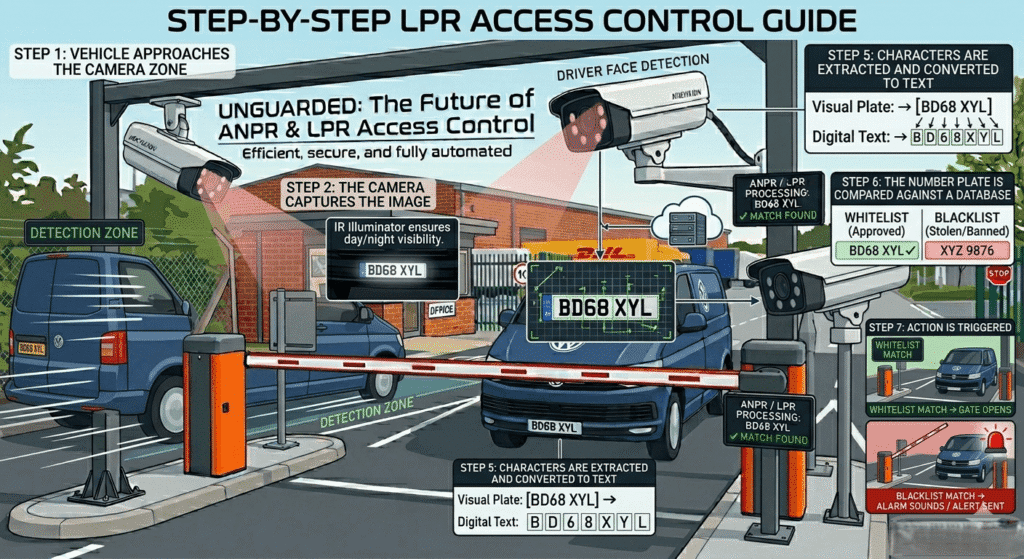
Key Components of an LPR/ANPR System
|
Component
|
Function
|
Typical Specs
|
|
LPR/ANPR Camera
|
Captures vehicle and plate images.
|
2-4+MP, built-in IR (850 nm), fast shutter (1/1000 s+), motorised varifocal lens.
|
|
Processing Unit / Server
|
Runs OCR software and manages databases.
|
High-performance CPU/GPU, ample RAM, and large storage. (Edge cameras integrate this.
|
|
Software (OCR Engine)
|
Translates images to text.
|
95-99% accuracy, multi-country plate support, database management.
|
|
Barrier / Gate
|
Controls physical access.
|
Fast opening (1-3s), relay output integration.
|
|
Display Screen (Optional)
|
Shows plate number or instructions.
|
High-brightness LED, weatherproof.
|
|
Network Infrastructure
|
Connects components.
|
PoE switches, Cat6 cabling.
|
Types of LPR/ANPR Cameras
Where is LPR/ANPR Used? (Applications)
How to Install an LPR/ANPR System (Step-by-Step Guide)
Step 1: Site Survey. Assess the location: lane width, vehicle speed, and sun position.
Step 2: Camera Positioning. Critical for straight-on plate viewing.
Step 3: Lighting Assessment. Ensure built-in IR illumination covers the capture zone; add external IR if needed for dark areas.
Step 4: Network Setup. Run Cat6 cabling from the camera to the PoE switch and NVR/server, ensuring sufficient bandwidth.
Step 5: Configure software, like “Region of Interest”, and set up the allowed and blacklisted.
Step 6: Integration. Connect the camera/server relay output to the barrier gate controller; configure the software to open the gate for whitelisted plates.
Step 7: Testing. Thoroughly test with various vehicles at different speeds, day and night.
Step 8: Fine-Tuning. Adjust camera shutter speed (faster for moving cars), exposure, and physical angle for 95%+ read rate.
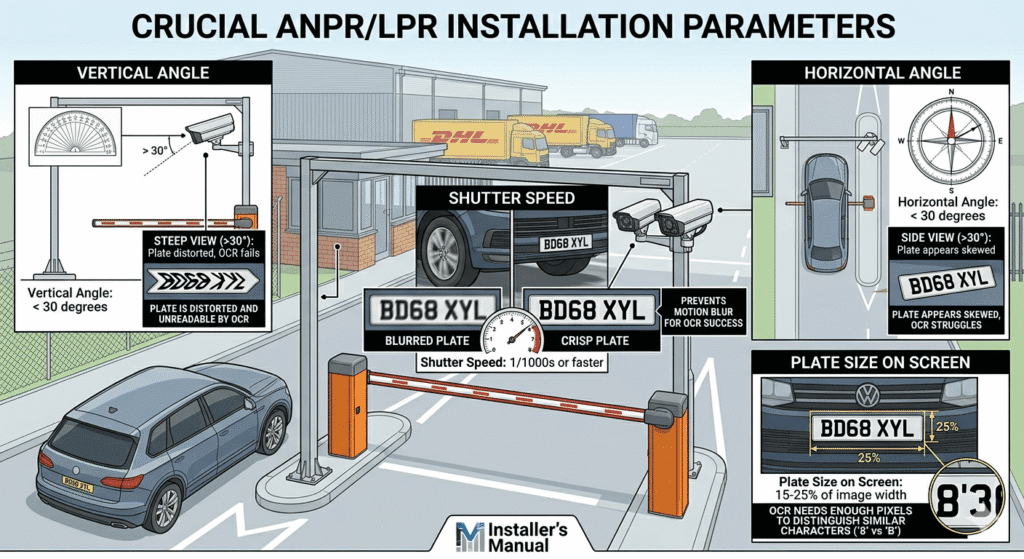
Crucial Installation Parameters
|
Parameter
|
Recommended Value
|
Why It Matters
|
|
Vertical Angle
|
Less than 30 degrees
|
If the camera looks down too steeply, the characters on the plate become distorted and unreadable by the OCR.
|
|
Horizontal Angle
|
Less than 30 degrees
|
If the camera is too far to the side of the lane, the plate appears skewed.
|
|
Shutter Speed
|
1/1000s or faster
|
Prevents motion blur. A blurry plate cannot be read by the software.
|
|
Plate Size on Screen
|
15-25% of image width
|
The OCR engine needs enough pixels to distinguish between similar characters (like ‘8’ and ‘B’).
|
What is UVSS (Under Vehicle Surveillance System)?
How Does UVSS Work? (Step-by-Step)
Step 1: Vehicles drive over the scanning unit at a controlled speed (5-10 km/h).
Step 2: Line-scan cameras capture thousands of thin, single-pixel-wide images per second, illuminated by bright LED.
Software instantly stitches these lines into a single, seamless, high-resolution image.
Systems compare the current image with a historical “baseline” image if the vehicle has visited before.
Step 5: The image is displayed for operator review. AI-powered UVSS can automatically highlight differences, alerting operators to new foreign objects.
Key Components of a UVSS System
|
Component
|
Function
|
Key Specifications
|
|
Scanning Unit (Cameras)
|
Captures the undercarriage image.
|
Line-scan technology, IP68 waterproof rating, heavy-duty weight capacity (up to 50 tonnes).
|
|
Illumination System
|
Lights up the dark underside of the vehicle.
|
High-intensity LED arrays, daylight-readable.
|
|
Processing Unit
|
Stitches the images and runs comparative AI.
|
High-end workstation PC with dedicated graphics processing.
|
|
Display Monitor
|
Interface for the security operator.
|
Large (24″+) high-resolution monitor for detailed inspection.
|
|
Induction Loops / Sensors
|
Detects vehicle presence to trigger the cameras.
|
Magnetic loop detectors or photoelectric beams.
|
Types of UVSS Systems
|
Type
|
Installation
|
Cost
|
Best For
|
|
Fixed / Embedded
|
Requires civil works to cut a trench in the road. The scanner sits flush with the surface.
|
High
|
Permanent checkpoints, embassies, military bases, and critical infrastructure.
|
|
Portable / Mobile
|
Ramp-style units that are placed on top of the road surface. Can be deployed in 15 minutes.
|
Medium
|
Temporary events, VIP summits, police checkpoints, and rented facilities.
|
|
Surface-Mounted
|
Bolted to the road surface with small ramps but meant to stay in one place.
|
Medium
|
Locations where digging a trench is impossible (e.g., above underground parking).
|
How to Install a UVSS System (Step-by-Step)
Step 1: Site Selection
Select a flat, well-drained location where vehicles drive straight and slow (5-10 km/h).
Step 2: Civil Works
For embedded systems, cut a trench in the road and install drainage to prevent flooding.
Step 3: Hardware Installation
Secure the UVSS scanning unit in the trench. Install induction loops before and after the scanner to trigger the system.
Step 4: Cabling
Run heavy-duty power and data cables from the scanning unit to the security cabin.
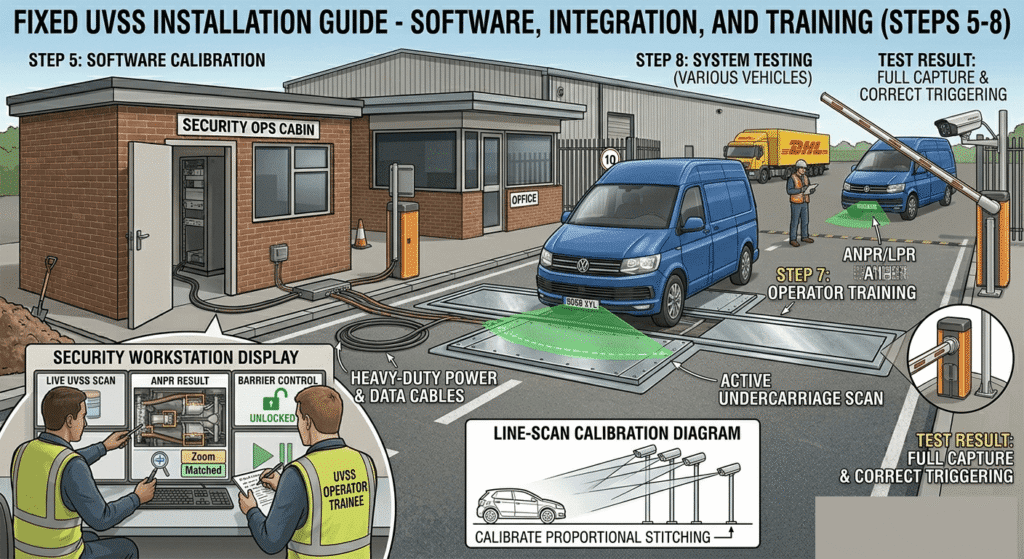
Step 5: Software Setup
Install UVSS software on the workstation and calibrate line-scan cameras for proportional image stitching.
Step 6: Integration
Connect the UVSS software to the ANPR system and physical barrier gates.
Step 7: Operator Training.
Train security staff on image review, Zoom functions, and identifying suspicious modifications or devices.
Step 8: Testing
Test with various vehicle types (sedans, SUVs, and buses) to ensure correct triggering and full vehicle capture.
Common Challenges and Solutions
Top Brands and Manufacturers
Frequently Asked Questions (FAQ)
What is the difference between LPR and ANPR?
There is no technological difference. LPR (licence plate recognition) is the term used primarily in the Americas, while ANPR (automatic number plate recognition) is used in the UK, Europe, and other regions.
How accurate is ANPR technology?
Modern, properly installed ANPR systems using AI-based OCR engines typically achieve accuracy rates between 95% and 99% under normal conditions.
Can ANPR work at night?
Yes. ANPR cameras are equipped with powerful infrared (IR) illuminators. The IR light reflects off the retro reflective coating on licence plates, allowing the camera to capture a clear image in total darkness.
How fast can a vehicle be moving for ANPR to work?
Standard parking LPR cameras work up to about 40 km/h (25 mph). Specialised highway ANPR cameras can accurately read plates on vehicles travelling at speeds exceeding 200 km/h (120 mph).
What does UVSS detect?
A UVSS is designed to detect anomalies on the undercarriage of a vehicle. This includes hidden explosive devices (IEDs), smuggled contraband, weapons, or unauthorised modifications to the vehicle’s chassis.
Can UVSS work in rain or snow?
Yes, outdoor UVSS units are heavily weather-sealed (usually IP68 rated). However, heavy snow or mud physically covering the vehicle’s undercarriage will obscure the camera’s view.
Do I need both ANPR and UVSS?
It depends on your security needs. For a commercial parking garage, ANPR is sufficient. For a military base, embassy, or critical infrastructure facility, combining both is highly recommended to identify both the vehicle and potential hidden threats.
